
Food safety checks due
See which checks are due, overdue, or not started, by location.
Built by operators for operators
Know what needs attention before it becomes a problem.
Food safety, daily sales, inventory, and transfers between locations, connected in one Restaurant Operating System built by operators.
Built for multi-location restaurant operators who need clarity, control, and fewer operational surprises.
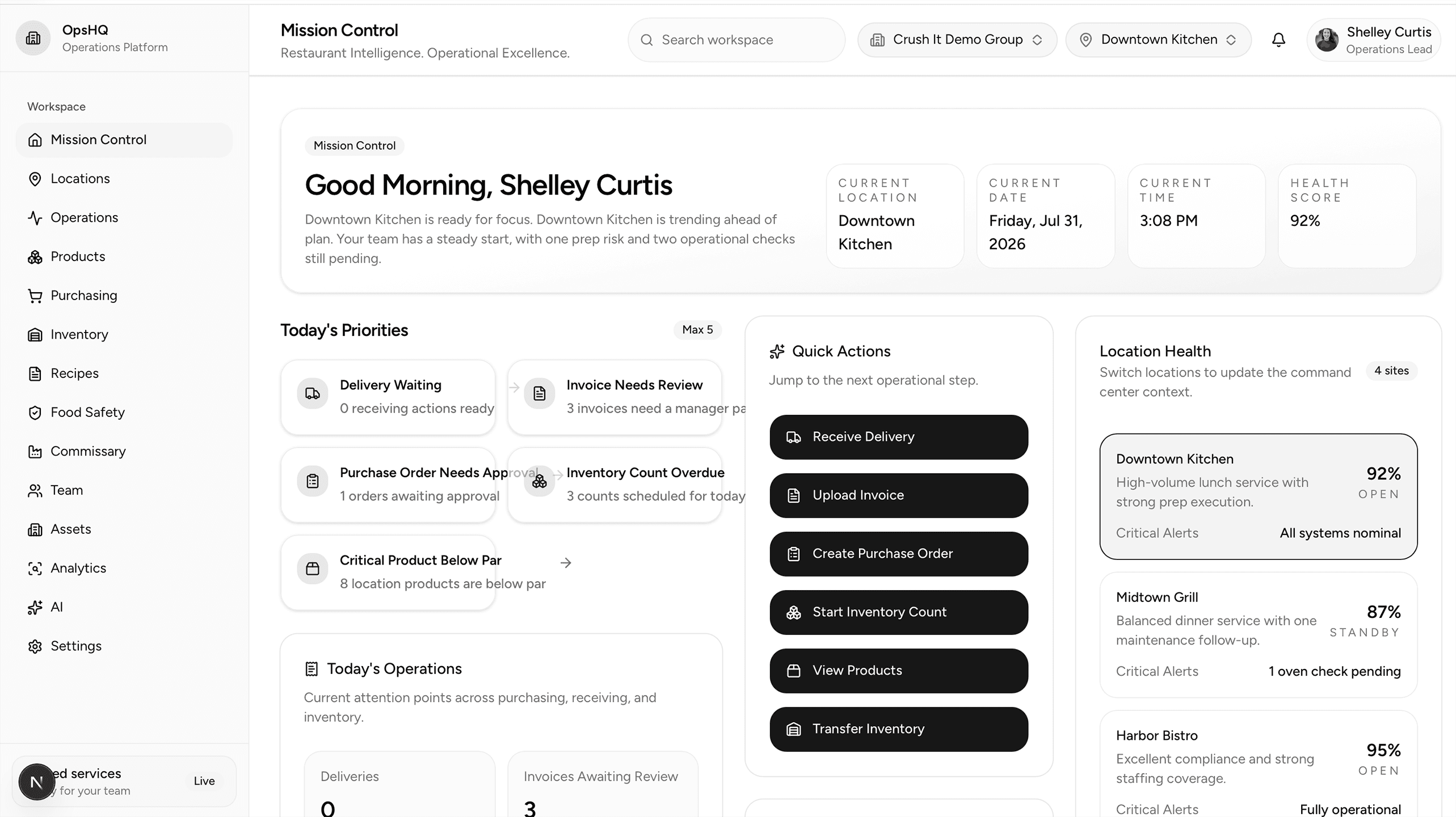
Mission Control
Know what needs attention before it becomes a problem
Operator credibility
Designed for
Main value
Start the day with one list, across every location.
See which checks are due, overdue, or not started, by location.
See corrective actions that are still open, before they are forgotten.
See last year's sales for the same day, by location and in total. That is the number to beat today.
See transfer orders waiting to be fulfilled between locations.
See which counts are finished, in progress, or not started, by location and storage area.
See which locations need attention today, and go straight to the list behind the number.
Available now
Mission Control
Mission Control brings the day's priorities into one view, so every location knows what to handle first.
Start every day knowing exactly what requires attention.
Mission Control brings the day's priorities into one view, so every location knows what to handle first.
Available now
Food safety
Build a check once, then use it at every location, in the order that location works. Staff record readings and notes as they go, and problems are recorded on the check, not on paper.
Complete food safety checks the same way at every location.
Build a check once, then use it at every location, in the order that location works. Staff record readings and notes as they go, and problems are recorded on the check, not on paper.
Available now
Sales
The daily entry follows the same sections as the ledger your managers already know, so nothing has to be learned twice. Totals and percentages calculate as the day is entered.
Enter the day once, and see the sales to beat today.
The daily entry follows the same sections as the ledger your managers already know, so nothing has to be learned twice. Totals and percentages calculate as the day is entered.
Available now
Inventory and transfers
One product list for the whole organization. Counts, balances, and every movement are kept, so a manager can always answer what moved, where, and when.
Count by location and storage area, and move product between locations with a record.
One product list for the whole organization. Counts, balances, and every movement are kept, so a manager can always answer what moved, where, and when.
Available now
Training
Tests, documents, and announcements live in one place, assigned to the people who need them.
Train every location the same way.
Tests, documents, and announcements live in one place, assigned to the people who need them.
Purchasing
Purchasing helps teams build clean orders and maintain consistency across locations.
Turn par levels and on-hand inventory into faster, more accurate orders.
Purchasing helps teams build clean orders and maintain consistency across locations.
Receiving
Receiving captures discrepancies and connects them directly to inventory and invoices.
Record what arrived and maintain a complete audit trail.
Receiving captures discrepancies and connects them directly to inventory and invoices.
Invoice Processing
Invoice Processing reduces repetitive entry and clarifies what needs review before posting.
Review, match, resolve exceptions, and create receiving records without duplicate entry.
Invoice Processing reduces repetitive entry and clarifies what needs review before posting.
Why OpsHQ
Every workflow reflects real restaurant operations, because it is used in real restaurants first.
Products, food safety checks, sales, and inventory stay connected, so locations are not working from different lists.
Software surfaces what needs review. Managers decide what happens next, and nothing important posts without a person approving it.
Important actions show who did it, what changed, and when.
Multi-location
OpsHQ helps leadership maintain standards while each location works with its own pace, vendors, and operational realities. Location health for every location is shown in Mission Control.
Founder Story
After decades running restaurants and managing multiple locations, Shelley Curtis saw the same problem repeatedly: restaurant teams were forced to adapt their operation to disconnected software.
OpsHQ was created to reverse that relationship.
The goal is simple: give restaurant operators one clear system that reflects how their teams actually check, count, transfer, sell, and manage the day.
OpsHQ is in daily use at New York Bagels 'N Bialys, the multi-location restaurant group Shelley co-owns. It is the first operation running it, and every workflow on this site is used there first.
Early Access
OpsHQ is currently inviting a small group of restaurant leaders to test the platform and provide direct feedback.